

29th-Aug-25, 07:40 PM
MICROCONTROLLER REMOVAL AND REPLACEMENT
The microcontroller used in the C7042 Advanced Power Base (APB) is the:
PIC24HJ64GP206
From here on we will refer to it as the PIC24. It is a fine pitch 64 pin microcontroller.
First two points of caution:
1/ When removing the PIC24 ensure the solder on all 64 pins is molten. If any pin remains soldered to its underlying pad when lifting the PIC24 the underlying pad will be damaged.
2/ When soldering the new PIC24 in place take the greatest of care to ensure that no solder bridging occurs between adjacent pins. If this happens it is extremely difficult or even impossible to correct.
Now to return to the procedure…
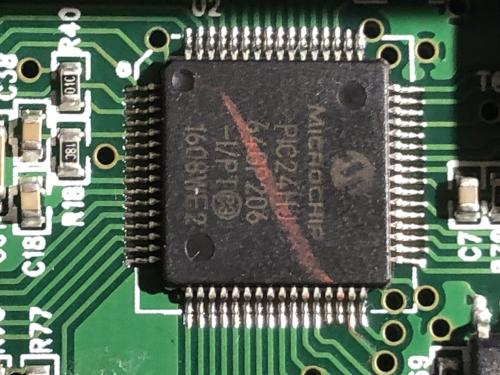
The photo below shows the PIC24 prior to removal.
Step 4: Flood all four sides of the PIC with fresh solder using a fine tipped soldering iron.
Step 5: Create a frame around the PIC24 on three sides using 8mm Kapton tape to protect nearby components from excess heat. The aluminium heatsink acts as the forth side of the frame.
Step 6: Heat the PIC24 using a hot air gun with an 8mm diameter nozzle and an air temperature of 285 degrees C.
Once all four sides of solder surrounding the PIC24 have become molten extremely gently tap the PIC24 to see if it is free to move. If so, carefully lift away the PIC24 with fine tweezers. If it is not free to move, continue to heat for a few more seconds.
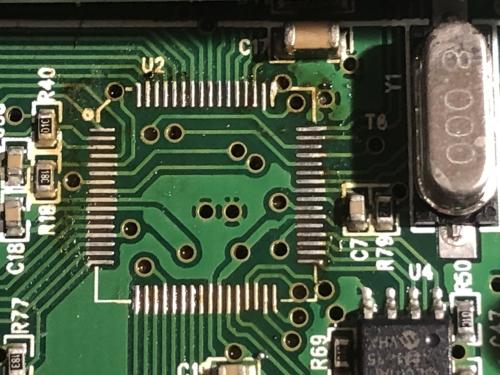
Step 7: Clean the 64 solder pads and then add fresh solder to each pad using a fine tipped soldering iron. This step is critical as this is the solder which will form the electrical connections with the PIC24.
The photo below shows the cleaned and fresh solder prepared pads.
Step 8: Extremely carefully position the new PIC correctly aligned over the solder pads then ‘tack’ solder each of the 64 pins to the underlying pad using a clean tipped fine solder iron. No solder is added at this stage as this would risk bridging between pins. Then repeat the tack soldering again for each of the 64 pins to ensure 100% success.
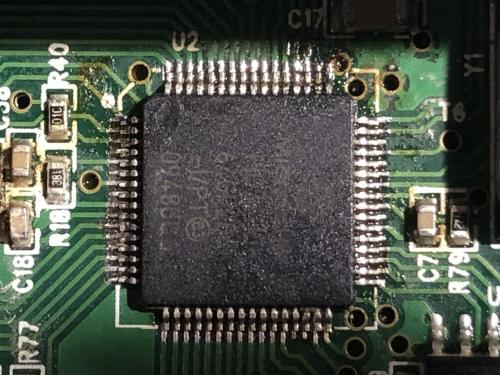
The photo below shows the replacement PIC24 correctly soldered in place using the above procedure.
Step 9: Use a continuity tester to double check that all 64 pins are electrically connected to their underlying pad. This is carried out for each pin by testing continuity between the top of the pin and a known track connection point on the main board.
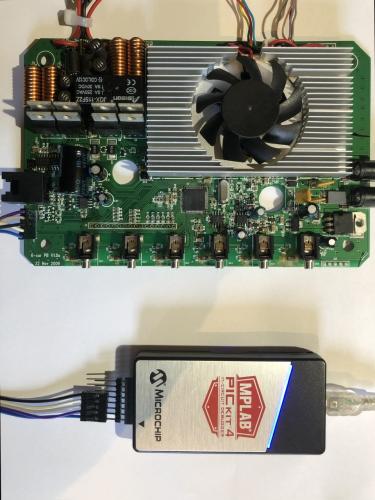
Step 10: Solder into place a 5 pin header at the ICSP interface and then connect a PICKIT programmer. Then load APB HEX firmware that includes a suitable bootloader. We will require this bootloader to be present when later we use standard procedures to upgrade the firmware to version 1.009.
The photo below shows the APB main board connected to a PICKIT4 using the ICSP interface. Power at this stage is provided via the PICKIT only. The required voltage is 3.3V.
At this stage the hard work is done. Just the LED/button interface to replace, firmware to be upgraded to v1.009, then full system testing.
This will be covered next :)
Hope you enjoyed the journey so far?
c
The microcontroller used in the C7042 Advanced Power Base (APB) is the:
PIC24HJ64GP206
From here on we will refer to it as the PIC24. It is a fine pitch 64 pin microcontroller.
First two points of caution:
1/ When removing the PIC24 ensure the solder on all 64 pins is molten. If any pin remains soldered to its underlying pad when lifting the PIC24 the underlying pad will be damaged.
2/ When soldering the new PIC24 in place take the greatest of care to ensure that no solder bridging occurs between adjacent pins. If this happens it is extremely difficult or even impossible to correct.
Now to return to the procedure…
The photo below shows the PIC24 prior to removal.
Step 4: Flood all four sides of the PIC with fresh solder using a fine tipped soldering iron.
Step 5: Create a frame around the PIC24 on three sides using 8mm Kapton tape to protect nearby components from excess heat. The aluminium heatsink acts as the forth side of the frame.
Step 6: Heat the PIC24 using a hot air gun with an 8mm diameter nozzle and an air temperature of 285 degrees C.
Once all four sides of solder surrounding the PIC24 have become molten extremely gently tap the PIC24 to see if it is free to move. If so, carefully lift away the PIC24 with fine tweezers. If it is not free to move, continue to heat for a few more seconds.
Step 7: Clean the 64 solder pads and then add fresh solder to each pad using a fine tipped soldering iron. This step is critical as this is the solder which will form the electrical connections with the PIC24.
The photo below shows the cleaned and fresh solder prepared pads.
Step 8: Extremely carefully position the new PIC correctly aligned over the solder pads then ‘tack’ solder each of the 64 pins to the underlying pad using a clean tipped fine solder iron. No solder is added at this stage as this would risk bridging between pins. Then repeat the tack soldering again for each of the 64 pins to ensure 100% success.
The photo below shows the replacement PIC24 correctly soldered in place using the above procedure.
Step 9: Use a continuity tester to double check that all 64 pins are electrically connected to their underlying pad. This is carried out for each pin by testing continuity between the top of the pin and a known track connection point on the main board.
Step 10: Solder into place a 5 pin header at the ICSP interface and then connect a PICKIT programmer. Then load APB HEX firmware that includes a suitable bootloader. We will require this bootloader to be present when later we use standard procedures to upgrade the firmware to version 1.009.
The photo below shows the APB main board connected to a PICKIT4 using the ICSP interface. Power at this stage is provided via the PICKIT only. The required voltage is 3.3V.
At this stage the hard work is done. Just the LED/button interface to replace, firmware to be upgraded to v1.009, then full system testing.
This will be covered next :)
Hope you enjoyed the journey so far?
c
![[+]](https://slotracer.online/community/images/bootbb/collapse_collapsed.png)