Posts: 1,254
Threads: 84
Likes Received: 1,043 in 523 posts
Likes Given: 247
Joined: Apr 2019
Location France
Just interested to see what a straight screen shot as JPEG looks like in screen.
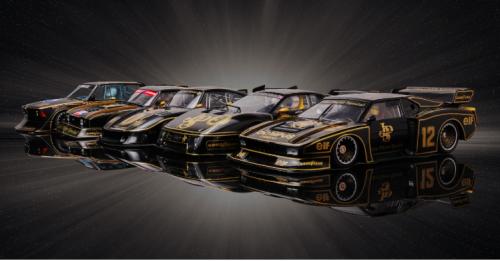
Hmmm - certainly lacks definition but not too bad when clicked on!
![[+]](https://slotracer.online/community/images/bootbb/collapse_collapsed.png) •
•
Posts: 282
Threads: 6
Likes Received: 353 in 150 posts
Likes Given: 196
Joined: Jul 2020
It seems my last reply didn't actually work, so here goes a 2nd time...
Are you using Scale in PS to resize the original image? You shouldn't have to crop at all, unless you want to. Your original picture looks fantastic and is huge (5280x2729)!!
Also, and here's a point that I don't think many are aware of... I intend to click on an image to see it's full resolution, I don't expect to see a nice crisp detailed picture in the forum post because I know there's limitations across the forum boards - they don't want to pay to store your data on their server.
So always click on an image if you want to see it better.
(This post was last modified:
2 hours ago by
DPJ.)
1 member Likes DPJ's post:1 member Likes DPJ's post
• JasonB
Posts: 2,361
Threads: 106
Likes Received: 2,448 in 1,149 posts
Likes Given: 7,786
Joined: Mar 2019
Location Farlington, North Yorkshire, UK
(22nd-Oct-26, 11:21 PM)fotodoug2 Wrote: I've knock the resolution down to 72dpi, and it tells me that 2"x1.5" is still too big...it says the limit is about 6500 kb. 2"x1.5" is 12500 kb.
There is a limit of just under 6Mb, or 6000kb, but something doesn't sound quite right there. A photo of that resolution and size would not normally have a file size of 12.5Mb.
I've had a look through the folders of the photos that you sent to me, and kindly allowed us to use here, and something like 95% of those photos would happily post here to the forum, even images as large as 3000 x 2000 pixels, and larger. Those are quite large images for web use, and we've deliberately set the forum limit high enough to accept them.
Just by way of comparison, I don't have any of your photos that are over 10Mb file size, even the huge ones.
I think I'm safe in saying that the admin team would be happy to increase the limit on photo sizes if it meant we get to see more of your lovely photos, but as I said, I suspect that in this case something has gone awry with the conversion process, it shouldn't be that big for a small size.
•
Posts: 2,361
Threads: 106
Likes Received: 2,448 in 1,149 posts
Likes Given: 7,786
Joined: Mar 2019
Location Farlington, North Yorkshire, UK
(2 hours ago)DPJ Wrote: It seems my last reply didn't actually work, so here goes a 2nd time...
Are you using Scale in PS to resize the original image? You shouldn't have to crop at all, unless you want to. Your original picture looks fantastic and is huge (5280x2729)!!
Also, and here's a point that I don't think many are aware of... I intend to click on an image to see it's full resolution, I don't expect to see a nice crisp detailed picture in the forum post because I know there's limitations across the forum boards - they don't want to pay to store your data on their server.
So always click on an image if you want to see it better.
That's true or mostly true.
The forum software does resize images, and we've set the size to be much bigger than a thumbnail, but not nearly as big as the original image. If memory serves I think it's 500px wide.
The reasoning behind that is so that anybody with a slower connection doesn't have to wait five minutes to load a thread with loads of full sized pictures in it. It was a balance we tried to find, and to be honest I stand by it, full sized photos are just a click away.
But it's nothing to do with money. If you upload an image here, we do store the full sized image, and we do pay for it, otherwise you wouldn't be able to click on it and see the full sized version.
It was a deliberate decision to allow faster loading of threads, whilst leaving members free to view full sized photos if they choose.
•



